




DIY POS Adventure
By Jeremy Peterson
Why I was an idiot for building my own POS system—and why more independent home improvement retailers should now consider doing the same.
Now that I have your attention, let me give the situation some context. It was 2021, and we had decided to open a brand-new, ground-up store. The plan was to open with our POS provider at the time, but we met a surprising amount of resistance. Unfortunately, our software version was no longer being supported, and the other options just did not fit our business needs.
Our website at the time for our South Florida stores (familyhardware.com) was a WordPress production with a simple shopping cart plug-in. Even so, revenue on our site was nearly half a million dollars and growing. Imagine a system with hundreds of patchworked processes, in which one single failure meant everything else failed. That was our site. Part of this patchwork was our POS integration. We were able to display on-hand inventory and do a slew of other things by directly interacting with the database. It was not pretty, but it worked.
Realizing the website was maxed out, we had decided to start coding our own solution, something that could handle all our pain points and business logic with ease. We still required direct access to our POS data, though—and that’s when the lightbulb turned on.
Our thought process was that the new store was about 12 months out, so why not just bolt a POS system onto what we had already built for the website? How hard could that be, right? Extraordinarily hard, it turns out. Two months in, we scrapped the whole thing and started from scratch. I’d gone all-in on the latest and greatest tech, the kind of stuff that makes sense only if you’re Amazon or Google. Eventually I had to admit that my excitement about using these technologies was outweighing any real need we had for them, and it was making everything way more complicated than it had to be.
Fast-forward to two weeks before our soft opening. We finally had a fully functional, albeit extremely stripped-down, POS system. It met our basic requirements: taking in cash and credit cards, charging house accounts, printing receipts and tracking inventory. Being a new location, we had a grace period while building up the business to work out bugs and add features. The final transition occurred for us about six months after the initial launch at our new location.
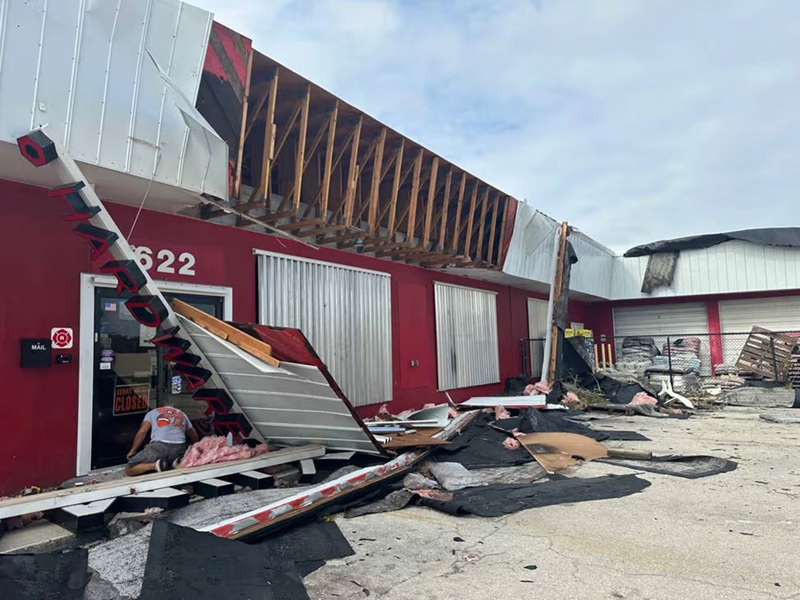
Our original store had been nearly destroyed by Hurricane Ian in September 2022. With our inventory half trashed and no power to the building, we made the choice at that moment to switch our existing location. So with a few cellular-powered tablets, we were able to launch and stay operational through one of the most chaotic times in our store’s history.
It has been three years now, and I can say it was one of the best choices I’ve ever made. There was certainly doubt along the way, and plenty of head-scratching from my peers. But we now have our own platform that is fully customizable and lightning-fast for us to implement features.
Why Now is the Time for a Custom POS System for Hardware Stores
I decided to write this piece because now, more than ever, the scenario I describe is possible for anyone in our industry. The timing for us could not have been better, and it was all luck. With the onset of AI, our development costs have gone down nearly 90 percent. Features we once had to weigh against the cost of developing are now solved and launched as fast as we can prompt and test.
In the past three months since we incorporated Anthropic’s Claude Code into both our website and point of sale, we’ve launched more features and enhancements than we did in the previous three years, and we see no slowdown to this trend.
I don’t think this article would have been appropriate three years ago—the investment both in money and time would have been too great and barely feasible. That gap has now closed substantially and is closing more every month. As independent retailers, we now for the first time have tools at our disposal that can help us level the playing field against the big boxes and e-commerce giants. Am I suggesting you drop everything and get to work on your own POS system?
Absolutely not (though you could). But I am suggesting that any initiatives or ideas you might have thought far-fetched even a year ago, revisit them immediately—because right now, more than at any time in our industry’s history, anything is possible.

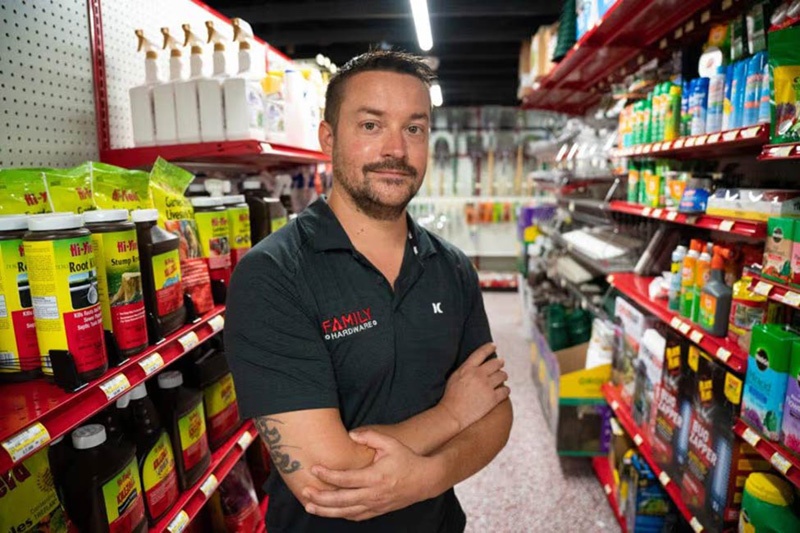
Jeremy Peterson is the owner of Family Hardware, with stores in Cape Coral and Fort Myers, Fla. He serves on the board of the North American Hardware and Paint Association.
6 Ways to Make Smarter Technology Decisions in Your Store
Jeremy Peterson decided to build his own POS platform at Family Hardware after years of evaluating systems, weighing costs and thinking long-term. His experience offers practical guidance for independent owners navigating major technology decisions.
- Start with the value proposition. If a vendor promises efficiency, quantify it. How much payroll will it save? How much more will your team accomplish? If the pitch centers on sales growth, ask how and where those gains will materialize. When the numbers aren’t clear, instinct still plays a role—but the premise should always be measurable.
- Recognize when you’ve outgrown your system. Frequent workarounds are a warning sign. If staff regularly rely on spreadsheets, third-party apps or manual processes to fill gaps in your POS, the system may no longer fit your operation. At the same time, many retailers use only a fraction of their system’s capabilities. Make sure you’ve fully explored what you already have before assuming it’s time to switch.
- Ask about alignment and longevity. Before signing or renewing, confirm whether the POS provider is a preferred vendor of your co-op or buying group. Review the company’s feature road map. For smaller providers, understand their five- to ten-year business plan. Stability matters. Relationships matter. Long-term direction matters.
- Think in decades, not quarters. A POS decision resembles buying a home. It shapes operations for 15 to 20 years or more. The most expensive system may create long-term savings. The cheapest option may introduce hidden costs. Evaluate the total life cycle impact, not just the upfront investment.
- Consider scalability from the outset. Peterson’s long-term goal is growth beyond a single location. By building for scale, his company positioned itself to add stores with minimal incremental software costs. Technology that supports expansion can compound its return over time.
- Leverage AI to lower the barrier. Peterson believes artificial intelligence has dramatically reduced development costs and shortened implementation timelines. For retailers willing to learn and experiment, the technology barrier has narrowed significantly. Time and execution are now the bigger constraints.